Posts

10 Year Challenge - It Changes So Slowly

Image
Weapons of great renown have to have a name. - Barbara Thorson (I Kill Giants) It's surprising how little technology has changed over the past 10 years, right? A decade ago I had an iPhone 2G which I named Kauro and it was amazing because it replaced carrying my Blackberry + iPod Mini which replaced my carrying my Ericsson + Palm + Archos Jukebox. These days my carry is iPhone XS Max, which is just a bigger more powerful version of what I've had for a decade. Go back two decades and I had a USR Palm Pilot Pro with Omnisky and no way to play music. A decade ago I had a MacBook Air (1st Gen) and that has been replaced with a iPad Pro Max. I'm not sure it's gotten lighter or I've gained portability, but the screen is so much more gorgeous today than it was then. I also definitely couldn't watch video and multi-task on that old MacBook Air, it would spin the fan to full and throttle the CPU (there were many nights I had my portable fan blowing across it full blast ...
Hey Siri, Where is My Car?

Image
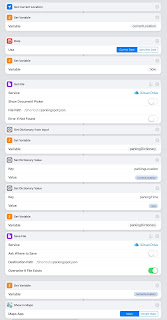
I spent the last 15 years looking for nails, because I am the hammer. - Merlin Mann When iPhone disconnects from a Bluetooth connection with a car, it does a special step to mark the location as "Parked Car" in the Maps app. My 2004 Prius is too old to have Bluetooth connection, so I was wondering if I could replicate this feature. Answer? Not really. I thought it would be awesome if I could get a little Bluetooth dongle that plugged into the car power port and said, "Hey, I'm a car!" That way anytime I turned on my car, the device would power up and BOOM I would have that functionality, but it doesn't seem like any such device exists. Next step, can I write a Siri Shortcut that does this? Also, not really, but I gave it go. The main shortcut command, "Get Current Location" provides the address you are at, not the GPS coordinates. If you're in the middle of a parking lot it's just going to provide the address of the place you've parked...

Getting Capped

Image
Isn’t that life bro? - Owen JJ Stone I'm moving my iPhoto library to iCloud and it is a insanely massive amount of data that burst me right through the Xfinity cap which is extremely expensive in overages. Comcast probably wants to solve this through zero rating and they've set things up to give them extreme power in the upcoming streaming battles if they remain free from consumer protections. I can choose between AT&T (U-Verse) and Comcast (Xfinity) for home broadband and there is no fiber running to my door so it's either ADSL or Cable modem. A few years ago, I gave up AT&T because ADSL has an upstream pretty much capped by the technical spec to be slow and I couldn't get past 1.5 mbps upstream which saturates in a moment running a couple of internet cameras. Once your upstream is totally used, the downstream is broken. When I moved Mrs. off her old 1TB SSD into the new MacBook Air with 256GB, the cost calculation for the 700 GB Photo library was to put into...

Overcast, AudioBooks, Huffduffer, and Workflow

Image
The best minds of my generation are thinking about how to make people click ads. - Jeff Hammerbacher My preferred way of reading AudioBooks is to get the chapters loaded directly into Overcast so I can intersperse them with them with podcast episodes and so I can use Smart Speed and faster playback. It’s wonderful to finish up an episode of TWiT followed up by a chapter of Embassytown and so on. You pay a subscription to Overcast so that you can upload your audio files to the Overcast servers and load your content from there. That is a fine way to do it. Castro actually supports side loading any audio files from your iCloud Drive, an even cooler feature, which I think will come next year in Overcast. But what to do for now? There is this great, simple, free service called Huffduffer that lets you host your own Podcast RSS file where you an use a web form and fill in the title, audio location, and it will add it in. So I subscribe to that RSS in Overcast, upload my audiobook file to ...

iPad Pro: The External Monitor Woes

Image
I love The Count of Monte Cristo. It taught me it’s best to be patient and calculated about revenge. - Jean Grae When the new iPad Pro was presented and it included support for an external 5K monitor I was excited, but the excited was misplaced or too early, because the current iOS 12 isn’t useful for me with an external display. It got me wondering what I really hoped for anyway. I bought Mrs.Chaos a Satechi USB Type-C hub for her upcoming MacBook Air, but figured I could give it a go on the new iPad Pro and it’s as expected. Split screen multi-tasking fails us. When you plug in an external display to the iPad, if you’re running an app full screen that supports it, it can display content on the second screen. This can be done really awesome by an app like Screens where you can remote connect to a multi-display Mac and have the two displays spread across your iPad monitor and external monitor. I want to run the Apple TV app and display a show on the external display while...

Charger Town

I do think as a species we are capable of sensing much more than we are capable of articulating. - Jony Ive I'm looking to upgrade Mrs.Chaos' 2011 MacBook Pro and it turns out to be a lot more fun than I thought I was going to be. I mean, there are some easy solutions if I'm willing to spending exorbitantly, but trying to be cost efficient in the process makes makes me take a train to complication-ville. The first part is that the family Apple Photos library is on her current MacBook Pro. It is 680GBs of photos locally stored on the 1TB SDD I bought aftermarket and installed. To upgrade the MacBook Air 2018 model to have enough storage would be the 1.5TB option fo an additional $1,200 which doubles the price of the computer. Fun times, right? Since that is the only major storage item on Mrs.Chaos' computer, I think the right solution is to move to iCloud Photos and pay for the 2TB family plan which costs $120/yr. So basically, we could store photos there for 10 year...

Getting the Sounds Going

Image
Technology is anything that wasn’t around when you were born. - Alan Kay For most people I receive a lot of iMessages from I've setup a custom text tone on their contact. I've got a couple new people I needed to give sounds and I wondered, can I do this entirely on the iPad? Well, probably not, but let's get started. I was asked to get a sound for "Mr Krabs" - which I'll admit, I didn't know who that was, and also Kermit the Frog's "Hi Ho." First step is to find a YouTube clip of sounds and download it using one of the web-based download services. I have found the best way to do this is get the URL YouTube, paste it into a YouTube download site, get the URL of the converted MP3 and then paste that URL into GoodReader to download. Trying to download/export directly in Safari don't always work well for me. Once the file is in GoodReader, I can export to Files / iCloud Drive. The next step is to trim down the portion of sound that I wan...